IoT & AUTOMATION+
A plant that tells you
what it needs.
☀
SOIL MOISTURE25%
PUMP ONDry soil + water available = pump on.

IOTICUS LABS / IOT AND AUTOMATION
Understand how physical conditions become data, how a program makes a decision and how an output changes a system.
Light, temperature and distance become inputs for model lamps, fans and other supervised low-voltage devices.
Students identify a need, choose a sensor, define a condition and test normal, boundary and failure cases. They explain when manual control is needed.
Cause and effect, systems thinking, measurement and responsible design. Students practise looking beyond a working demo to the person using it.
Role-play a sensor, controller and output using instruction cards. Change one condition and trace which part of the system should respond.
Dry soil + water available = pump on.
35 cm away. The robot can move.
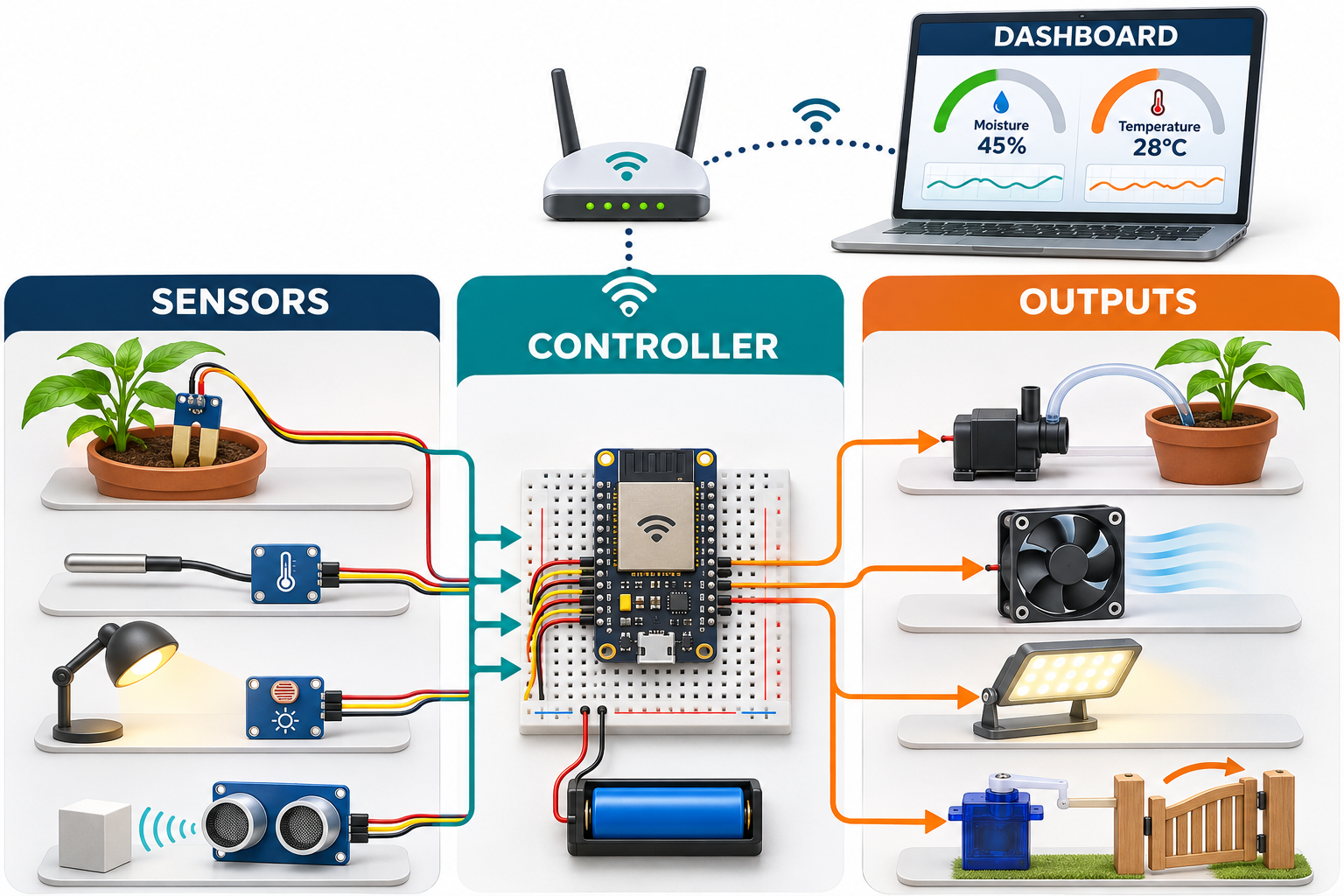
A sensor reads moisture, temperature, light or distance. A controller checks a rule and operates a pump, fan, lamp or servo through suitable drivers. Students begin with supervised low voltage models.
A compatible wireless controller or gateway can share device readings through a network. Students explore dashboards, data freshness, permissions and what should keep working if a connection fails.
Try dry soil with an empty tank. The pump stays off. Students learn to include a water availability condition and explain why an automated system needs more than one ideal test.
Starting points adapt to experience. Every level includes making, running, testing and explaining working software.
Use visual sequences and blocks to build an interactive scene or route. Predict the output and correct a wrong step.
Build a small game or simulator with conditions and repetition. Test exceptions and explain why a rule works.
Use loops, variables and sensor inputs. Develop a robot routine or interactive program, starting with a flowchart.
Introduce functions, data and structured debugging. Progress toward text-based Python or JavaScript when ready and build a useful automation or application.
Create HTML, CSS and JavaScript pages, or Python applications. Connect input, processing and output; test usability and invalid inputs.
Plan requirements, organise code, test edge cases and refine a working website, application or device prototype. Explain design decisions in a project demonstration.
Alongside robotics and automation, students practise reasoning, spatial thinking, focus, planning, communication and collaboration. Guided challenges combine online simulators with physical puzzles, construction tasks, unplugged algorithms and team design activities. Teachers ask students to predict, test, explain and revise.
We plan to add more skill-building activities, logic-development programmes and offline physical challenges. New activities will extend the current programme; they are not all available today. Each grade adds a further level of challenge, independence and reflection.